11 minutes read
What is a Shopify replatform, and when do you need one?
How a Shopify replatform works, which data you can import and what you have to rebuild, and how to tell whether your store needs one.

A Shopify replatform is the move of a live online store to Shopify from another platform, such as WooCommerce, Magento or a custom-built site. Your products, customers and past orders are imported into Shopify, the design is rebuilt as a Shopify theme, and old web addresses redirect to the new ones.
For many Magento stores, the reason to move now is that support is ending. Adobe ended standard support for Adobe Commerce 2.4.6 on August 11, 2026, and its lifecycle policy warns that 2.4.6 stores running PHP 8.2 put their PCI compliance at risk after December 31, 2026. For a store on that version, the decision has a deadline: upgrade Adobe Commerce, or move to another platform.
A replatform is a big project, though, and it’s only worth doing when running the old platform costs more than the move would.
This guide covers how a Shopify replatform works, which data you can import and what you have to rebuild, how long it takes, and how to tell whether your store needs one.
What is a Shopify replatform?
A Shopify replatform is the move of a whole online store, including its data, to Shopify from another ecommerce platform. It’s different from a redesign, which changes how a store looks but keeps it on the same platform.
Three kinds of project often get called a replatform. Only the first one moves your data:
| Replatform | Headless to theme | Redesign | |
|---|---|---|---|
| Platform changes | Yes | No | No |
| Data moves | Yes | No | No |
| Design rebuilt | Yes | Yes | Yes |
| Best for | Leaving another platform | A costly custom storefront | An outdated theme |
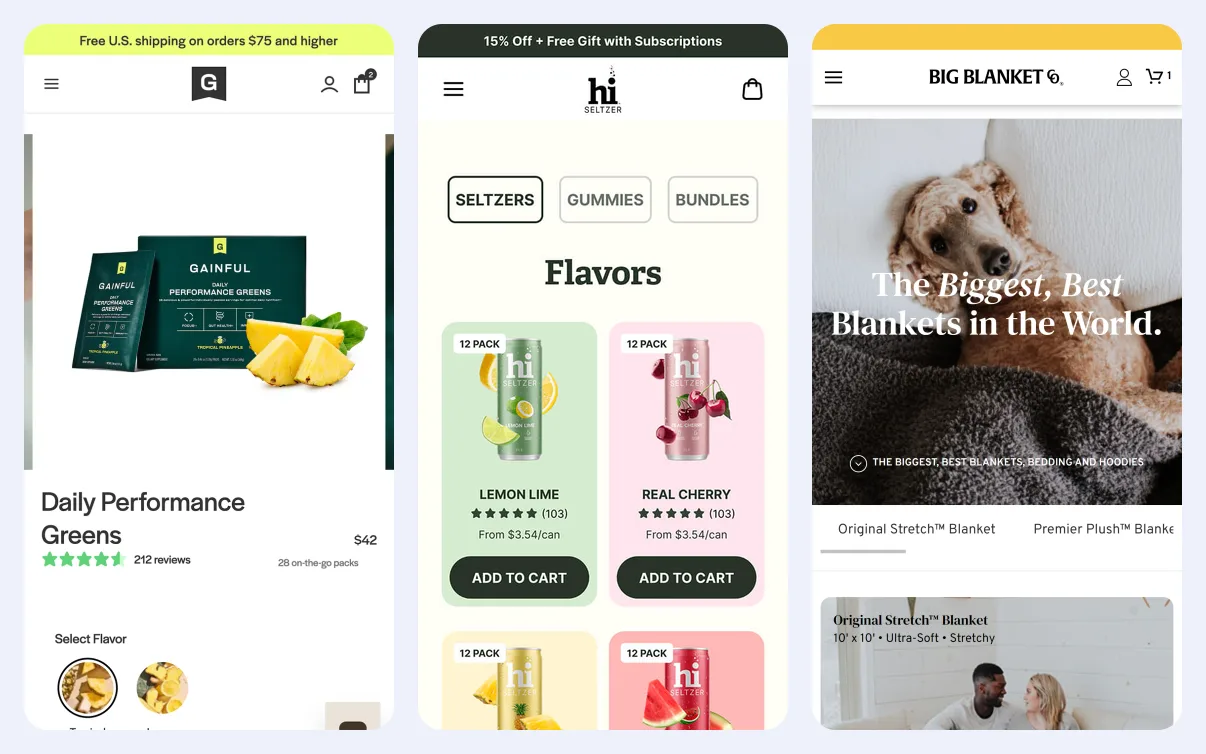
| Our example | Gainful, Hi Seltzers | Big Blanket | TileCloud |
A headless store already runs on Shopify, with a custom-built storefront on top. Its products, customers and orders are in Shopify already. Moving it to a Shopify theme only replaces the storefront, so there’s no data to import. Big Blanket, which sells oversized blankets, made that move and rebuilt its storefront in 16 business days.
How does a Shopify replatform work?
A Shopify replatform has six main steps. Your old store keeps taking orders until the last one, when you point your domain at Shopify.
1. Decide which data to bring
Start by listing the data on your current store and deciding what to keep. Shopify’s migration guide suggests reviewing these types:
- Products
- Customers
- Historical orders, meaning orders that have already been fulfilled
- Gift cards, certificates and store credit
- Blog posts
- Pages, such as your shipping policy, contact page or about page
A move is a good time to leave things behind. Old blog posts that get no traffic and discontinued products can stay on the old platform.
2. Import products, then customers, then orders
Import products first, then customers, then historical orders. Shopify connects each imported order to the products and customer it contains, and it can only do that when they’re already in the store.
Shopify’s free Store Migration app imports products and customers from Square, WooCommerce, Etsy, Wix, Amazon, eBay, Clover and Lightspeed. You can connect your old account or upload CSV files. Magento isn’t on that list, so Magento stores usually use a paid migration app, CSV files or a developer working with Shopify’s API.
Historical orders can’t be imported with a CSV file. They need a migration app or Shopify’s API.
Before you import orders, turn off new order notifications in your Shopify admin. Otherwise, every staff member who gets those notifications receives an email for each imported order, which can mean thousands of emails. Turn the notifications back on when the import is done.
3. Rebuild the design as a Shopify theme
Your old design doesn’t transfer to Shopify. Every page template, your header and menus, and any custom features are rebuilt in a Shopify theme.
For each plugin or custom feature on your old store, decide which of these replaces it:
- A built-in Shopify feature: Checkout, discount codes, Apple Pay and gift cards work without an app.
- A Shopify app: Reviews, loyalty programs and subscriptions usually come from an app.
- The theme itself: Features specific to your brand, like a product quiz or a bundle builder, can be built into the theme.
Most apps charge a monthly fee, and many add their own code to your pages. For features you use on every product page, the theme is often the better place to build them. If you build with Platter, your theme starts from our proprietary framework, which comes with 40+ features already built, including bundles and subscription options.
4. Set up shipping, taxes and payments
Shipping rates, tax settings and your payment provider don’t import. Set each one up in your Shopify admin, then place test orders to check them.
Run a test order for each way customers pay, such as a card, Apple Pay and a discount code. Check that the order confirmation email, the tax amount and the shipping charge are all correct.
5. Redirect your old URLs
Shopify uses fixed web addresses for products and collections, such as /products/blue-shirt and /collections/shirts. Most of your old URLs will change. A redirect sends anyone who visits an old URL to its new page, which keeps the search rankings and links that point at the old address.
To add redirects, go to Content > Menus in your Shopify admin and click View URL redirects. You can create them one at a time or import a CSV file of old and new addresses.
Shopify’s URL redirect rules have a few limits to plan for:
- Volume: A store can have up to 100,000 redirects, or 20 million on Shopify Plus.
- Live pages: A redirect only works from an address that shows a “page not found” error. If a live page exists at the old address, the redirect doesn’t run.
- Reserved paths: Addresses that start with
/shop,/apps,/cartor/orderscan’t be redirected. A store that kept its catalog under/shop/needs a plan for those URLs before launch.
6. Switch your domain
Once the new store has passed its tests, point your domain at Shopify. Just before you switch, run one last import of recent orders and new customers, so the days between your main import and launch day are included.
After launch, invite your customers to set a new password. Shopify can’t import passwords from another platform, because they’re encrypted outside Shopify. Shopify lets you send each customer an account invite to set a new one.
Which data can you import into Shopify?
You can import products, customers and historical orders into Shopify, along with gift cards, blog posts and pages. Your design, apps and integrations can’t be imported, so you rebuild or reconnect them.
Shopify’s import options, as of October 2026:
| Data | Can you import it? | How |
|---|---|---|
| Products, variants and images | Yes | Store Migration app, CSV file or a migration app |
| Customers | Yes, without passwords | Store Migration app, CSV file or a migration app |
| Historical orders | Yes | A migration app or Shopify’s API, not a CSV file |
| Gift cards and store credit | Yes | A migration app or Shopify’s API |
| Blog posts and pages | Yes | A migration app, Shopify’s API, or copy and paste |
| SEO titles and descriptions | Yes, with products | CSV file or a migration app, then check them |
| Design and page templates | No | Rebuilt as a Shopify theme |
| Plugins and integrations | No | Replaced by built-in features or apps, or reconnected |
A few details are easy to miss:
- Customer spending history: A customer CSV file can’t carry a customer’s total spend or order count. Shopify only counts orders placed in your Shopify store. To keep that history, import the orders themselves.
- Custom product data: Details like ingredient lists, dimensions or size guides usually move into Shopify’s custom fields, called metafields.
- Variants: A move is the easiest time to change how products are set up. When Platter moved Hi Seltzers, a THC beverage brand, to Shopify, products that had been complex variants became individual SKUs, which made inventory and reporting far easier.
When does a brand need to replatform?
A brand needs to replatform when running its current platform costs more in developer time, plugins and workarounds than moving to Shopify would. These signs usually show up first:
- The platform is losing support: Adobe Commerce 2.4.6 lost standard support in August 2026. Adobe Commerce customers get one year of extended support, to August 31, 2027, but the PHP 8.2 deadline at the end of 2026 still applies to stores running it.
- Developers spend their time on basics: On a custom-built site, engineers often maintain checkout, Apple Pay and discount codes, which come built into Shopify. Gainful, a performance nutrition brand, was in that position on its AWS-hosted store before Platter moved it to Shopify.
- Updates break the store: Stores that depend on many plugins can find that each update breaks part of the site. Hi Seltzers needed WooCommerce plugins even for simple reporting before it moved to Shopify.
- The marketing team waits on a developer: A new landing page, a banner or a promotion goes into a queue instead of going live the same day.
A store that’s already on Shopify doesn’t need a replatform. If the problem is the design, page speed or conversion rate, a new theme or ongoing work on the current store fixes it. TileCloud, an online tile brand, stayed on Shopify and replaced a customized Dawn theme, and its Shopify performance score went from about 9 to 81. Ongoing work with Platter starts at $8,000 a month.
To compare running costs before you choose a platform, read Shopify vs Magento and Shopify vs BigCommerce.
How long does a Shopify replatform take?
How long a Shopify replatform takes depends on how much data you move and how much of the store has to be rebuilt. For example, Gainful moved from a custom-built site to Shopify in under 90 days and kept its quiz-driven product experience.
These four factors set the timeline:
- Products: How many products you have, and whether they need restructuring before import.
- Orders: How many years of order history you bring.
- Integrations: How many other systems connect to the store, like an ERP, a subscription platform or an email tool.
- Custom features: How many features are built into the theme rather than added with an app.
If you want help deciding whether a move is worth it, request a free store audit. We’ll review your store page by page and send you a prioritized list of what to fix, so you know what a new platform has to solve before you commit to one.
What do you give up by moving to Shopify?
Moving to Shopify means giving up control of the server and some of the checkout, and taking on Shopify’s fees and app subscriptions. Plan for each one before you move.
Server and checkout control
On Magento or a custom-built site, your developers can change anything on the server. On Shopify, hosting and checkout are part of the platform. You customize them through apps and the settings your plan includes. Adding a custom field or a delivery-date selector inside the checkout steps needs Shopify Plus, as our Shopify Advanced vs Plus comparison explains.
Payment fees
If you use a payment provider other than Shopify Payments, Shopify charges a fee on every order, from 2% on the Basic plan down to 0.2% on Plus. For example, on a $100 order on Basic, that fee is $2, on top of what your payment provider charges. Shopify doesn’t charge this fee on orders paid through Shopify Payments. Our Shop Pay fees breakdown lists the rate on each plan.
App subscriptions
Features that were free plugins or custom code on your old platform often become monthly app fees on Shopify. Before launch, add up the monthly cost of every app the new store needs, and compare it with what you pay developers and plugin vendors today.
Frequently asked questions
How much does a Shopify replatform cost?
The cost of a Shopify replatform depends on how much data you move, how many integrations you reconnect and how much of the design is custom-built. When you compare quotes, ask each partner to price the data migration, the theme build and the redirects separately, so you can see where the money goes. At Platter, we scope new builds on their complexity, migration requirements and design needs.
Will replatforming to Shopify hurt my SEO?
Replatforming to Shopify shouldn’t hurt your SEO if every old URL redirects to its new address before launch. Check that no live page sits at an old address, because Shopify only runs a redirect from an address that shows an error. After launch, watch your top landing pages in Google Search Console for a few weeks and fix any that return errors.
Can you import order history into Shopify?
Yes, you can import order history into Shopify with a migration app or Shopify’s API, but not with a CSV file. Import products and customers first, so each order connects to them. Turn off new order notifications before the import, or your staff get an email for every order.
Do customers need new passwords after a replatform?
Yes, customers need new passwords after a replatform, because Shopify can’t import passwords from another platform. Send each customer an account invite from your Shopify admin to set a new one. You can also turn on Shopify’s new customer accounts, where customers sign in with a one-time code sent to their email instead of a password.
Do you need Shopify Plus to replatform?
No, you don’t need Shopify Plus to replatform. Every Shopify plan can import products, customers and orders, and every plan allows up to 100,000 URL redirects. Plus raises that limit to 20 million, for stores with more old URLs than that.
What happens to your plugins and integrations?
Your plugins and integrations don’t move to Shopify. Each plugin is replaced by a built-in Shopify feature, an app or a feature in the theme. Integrations with systems like an ERP, a subscription platform or your email tool need to be reconnected and tested with real orders on the new store before launch.
Create a more profitable store
Get strategies, tactics, and insights from the 200+ Shopify stores we've built, delivered to your inbox every week.
That didn't go through. Check your connection and try again.
Continue reading

How long does a Shopify build take?

Questions to ask a Shopify agency

WooCommerce vs Shopify: when should a growing brand switch?
How long does a Shopify build take?

Questions to ask a Shopify agency
WooCommerce vs Shopify: when should a growing brand switch?