11 minutes read
Has your Shopify store outgrown Dawn? What to do next
How to tell when your store has outgrown Dawn, what each option after it costs, and how to switch themes without breaking your store.

Dawn is Shopify’s free reference theme and the most-used theme on Shopify, found on 15.0% of the 3.5 million stores ShopThemeDetector tracks. Shopify released it in June 2021 with Online Store 2.0.
Dawn is built to fit any store, so its pages are simple on purpose. As a store grows, the gaps get filled one at a time: an app for bundles, a developer’s code edit for a custom section, another app for a size quiz.
Each app adds code to the pages shoppers load. Among Shopify stores with enough traffic to measure, 58.2% of those running 11 to 20 apps pass Google’s Core Web Vitals on mobile, against 74.3% of those running three, according to ShopThemeDetector’s October 2026 data. Apps aren’t the only difference between those stores, but it’s a reason to check what a theme can do before adding another app.
This guide covers how to tell when a store has outgrown Dawn, the four options after it, what changes when you switch themes, and how to switch without breaking your store.
What is the Dawn theme?
Dawn is a free Shopify theme that Shopify built as the reference design for Online Store 2.0. It shows how a theme should use sections, which are the blocks of content you add, remove and reorder in the theme editor.
Shopify maintains Dawn and releases updated versions through the Shopify Theme Store. Because Dawn is free and fast, it’s a common starting theme for new stores, and many developers use it as the base for custom work.
In 2025, Shopify released Horizon, a newer family of free themes. Horizon is built on nested theme blocks, which give you more control over layout in the editor than Dawn’s sections do.
When has a store outgrown Dawn?
A store has outgrown Dawn when most of the features it needs next require a new app or a developer editing theme code. Until then, Dawn is a good theme to stay on.
Dawn’s product and collection pages are plain because the theme is built to sell any product. That works for a small catalog. It gets harder once a store sells bundles, subscriptions or products that need a lot of explaining, like supplements or furniture.
Signs Dawn still fits
Stay on Dawn if most of these are true:
- Catalog: Your catalog is small, and your product pages already answer buyers’ questions.
- Editing: Your team changes pages in the theme editor without calling a developer.
- Apps: You use a handful of apps, and the list isn’t growing.
- Updates: Dawn’s code hasn’t been edited, so new versions from Shopify install cleanly.
Signs it’s time to move on
Plan a move if most of these are true:
- Product pages: Bundles, a product quiz or subscription options each need their own app.
- Editing: A developer edits theme code for routine work, like a new landing page layout.
- Apps: Your app list keeps growing, and each app adds its own scripts to your pages.
- Speed: Pages load slowly on phones, and the store struggles during sales like Black Friday.
TileCloud, an online tile brand, hit several of these on a customized Dawn theme. It had combined several apps to let shoppers order tile samples, and its worst performance problems came during Black Friday. Its rebuild replaced those apps with a custom cart for samples, and its Shopify performance score went from about 9 to 81.
Fixes to try first
Some gaps don’t need a new theme. If the gap is product information, like ingredients, dimensions or care instructions, Dawn can show it with Shopify’s custom fields, called metafields. If the gap is filtering, Shopify’s free Search and Discovery app adds filters to Dawn’s collection pages without a theme change.
Why does a customized Dawn get harder to update?
A customized Dawn gets harder to update because Shopify’s theme updates can’t always carry code edits forward. A developer has to reapply each edit that conflicts with an update.
Shopify’s help page on updating themes explains how updates work. When Shopify releases a new version of Dawn, you add it to your store as a draft copy, review it, then publish it. Changes you made in the theme editor, like section settings and page layouts, copy over automatically. Code edits copy over only when they don’t conflict with the update. When they do, Shopify marks the new copy “code edits could not be included”, and a developer has to reapply them.
Bullstrap, which sells Apple Watch bands and leather iPhone cases, ran into this on a heavily customized Parallax theme. Each round of developer changes made the theme harder to maintain. The team started adding apps instead of theme code.
Some new features can’t be added to an existing theme at all. When a feature needs an updated theme architecture, Shopify suggests adding a new theme that supports it instead.
For example, say a developer has edited Dawn’s product template to add a size guide and a custom bundle section. Each time Shopify releases a new Dawn version, that developer has to check both edits against the update and reapply them. Stores that skip this work stay on the version they have, and miss Shopify’s fixes and new features.
What are your options after Dawn?
The four options after Dawn are to keep customizing it, switch to another theme, rebuild on an agency’s codebase, or build a custom or headless storefront. For many growing brands, the real choice is between a premium theme and an agency codebase.
The four options compare like this:
| Option | Upfront cost | Who keeps it running | Best for |
|---|---|---|---|
| Customize Dawn | Developer hours per change | Your developer | One or two missing features |
| Another theme | Free, or about $200 to $400 | The theme’s developer | Gaps popular themes cover |
| Agency codebase | Quoted per store | The agency | Features specific to your brand |
| Custom or headless | The highest | Your engineers | Brands with engineers on staff |
Options after Dawn, October 2026. Paid theme prices from ShopThemeDetector, which counts 322 paid themes on the Shopify Theme Store with a median price of $300 (October 18, 2026).
Keep customizing Dawn
Keeping Dawn and adding code edits costs the least upfront. It makes sense when you need one or two features and your developer can maintain them. Each edit adds to the update work described above, though, so the cost grows with every change.
Switch to another theme
Switching to another theme suits stores whose gaps are features that theme developers already sell, like mega menus, color swatches and a sticky add-to-cart bar. Horizon is free. Paid themes on the Shopify Theme Store cost a one-time fee, and half of them cost between $212.50 and $360. Each purchase covers one store.
Rebuild on an agency codebase
Some agencies build every store from their own codebase, a theme they maintain and add features to over time. A rebuild on that codebase gives you pages designed around your products, and the agency keeps the code current. It costs more upfront than a paid theme, and it’s quoted per store.
Build a custom or headless storefront
A headless storefront is a custom-built front end that runs on top of Shopify. Shopify’s guide to headless commerce describes it as a fit for brands selling $50 million to $100 million or more a year online, with their own development team. Few stores moving off Dawn are at that size.
Compare running costs as well as upfront costs
The cheapest option upfront is rarely the cheapest to run. A paid theme is a one-time purchase, but each app you add to cover a gap is usually a monthly fee.
For example, a store paying for five apps at $30 a month spends $1,800 a year on them. That’s six times the $300 median price of a paid theme, every year. Kaged, a sports nutrition brand, removed 10 apps when it moved off its customized theme. Before you choose, list the apps and developer hours each option would replace.
Is a premium theme enough?
A premium theme is enough when your store’s gaps are features theme developers already sell. It stops being enough when the gaps are specific to your business.
The limit usually shows up on the product page. A premium theme is built to sell many kinds of products. Stores with unusual product pages still add apps on top of it. For example, a supplement brand with a subscribe-and-save offer, a product quiz and an ingredient panel would still need apps for some of those on most premium themes.
You can try a paid theme in your store before you buy it. Load your own products into the preview, then check your busiest product page on a phone. If that page still needs several apps to work, a premium theme won’t close the gap.
What did brands get when they moved off their theme?
The three brands below each ran a heavily customized theme before they rebuilt with Platter. Their published case studies give the results:
| Brand | Theme before | After the rebuild |
|---|---|---|
| TileCloud | Customized Dawn | Shopify performance score from about 9 to 81 |
| Kaged | Customized off-the-shelf theme | Live in under 60 days, 10 apps removed, conversion rate up 45.27% |
| Bullstrap | Customized Parallax | Add-to-cart actions up 26% over two years |
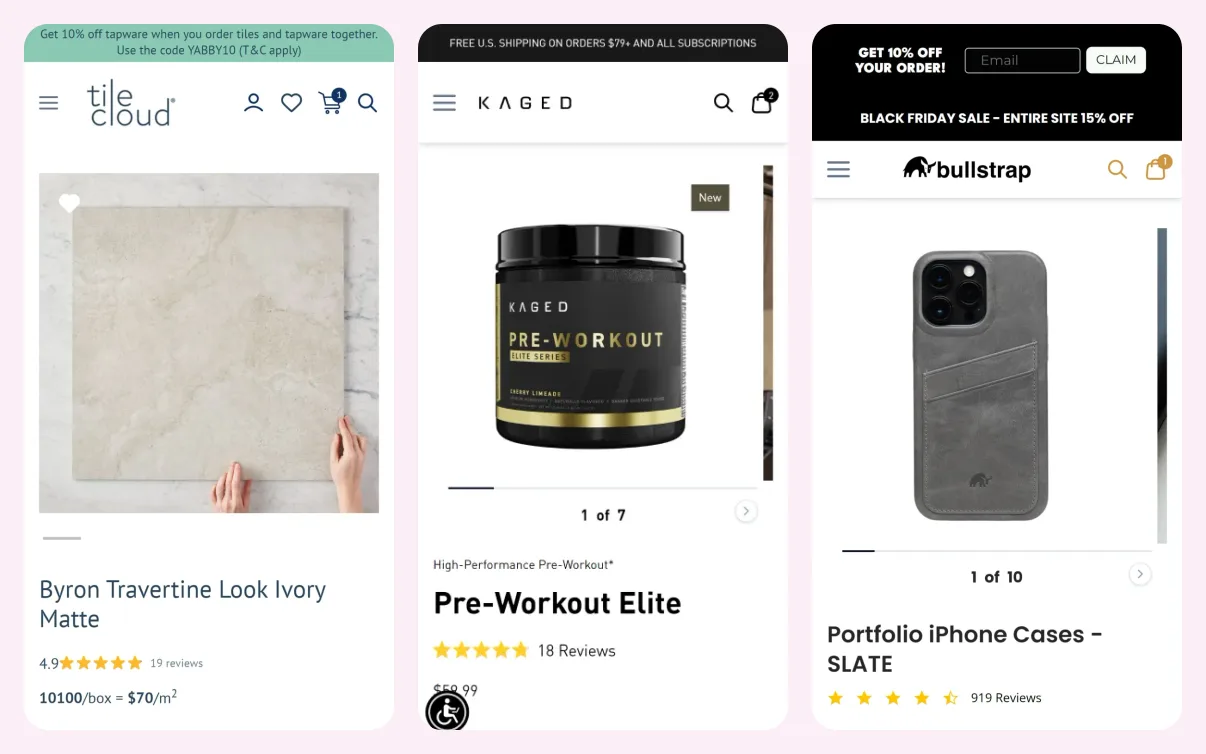
Each rebuild started from Platter’s proprietary framework, which comes with 40+ features already built, including bundles, subscriptions and landing-page sections. If you build with Platter, your theme starts from the same framework.
What changes when you switch themes?
When you switch themes, your products, customers, orders and URLs stay the same, because they belong to your Shopify store, not the theme. Your page layouts, theme settings and code edits belong to the old theme and don’t carry over.
Before you switch, plan for these changes:
- Page layouts: Your homepage, landing pages and product templates are rebuilt in the new theme.
- Code edits: Any custom code in Dawn has to be rebuilt in the new theme or replaced.
- Apps: Some apps aren’t compatible with every theme. Check each app’s documentation, or ask its developer, before you switch.
- Budget: Dawn is free, so any move adds a theme license or a build budget.
If you want help with changes after launch, ongoing work with Platter starts at $8,000 a month.
How do you switch themes without breaking your store?
To switch themes safely, build the new theme as a draft next to Dawn, test it with your real products, then publish it and keep Dawn as a fallback. Shoppers don’t see a draft theme until you publish it.
Follow these steps:
- List what Dawn can’t do. Write down each gap and the app or code edit that covers it today, with its monthly cost.
- Decide which apps the new theme replaces. Plan to remove each app only after the new theme’s version of that feature works.
- Add the new theme as a draft. Stores on Basic, Grow and Advanced can hold up to 20 themes, and stores on Plus up to 100. Share a preview link so your team can review the draft.
- Rebuild your pages. Recreate your homepage, product templates and landing pages, and move over any code edits you still need.
- Test on a phone first. Check product pages, search, filters, the cart and every app’s blocks. Then place a test order and check that your analytics records it once.
- Publish at a quiet hour, and keep Dawn. Leave Dawn in your theme library, so you can switch back if something breaks.
After you publish, remove the apps the new theme replaced, one at a time, and check the pages that used each one.
If you want help working out which of your gaps a new theme would close, request a free store audit. We’ll review your store page by page and send you a prioritized list of what to fix, so you know whether you need a new theme or a rebuild.
Frequently asked questions
Should you switch from Dawn to Horizon?
You should consider switching from Dawn to Horizon if you like Dawn but want more layout control without paying for a theme. Horizon is free and built on nested theme blocks. Moving to Horizon is still a theme change, though, so your layouts and code edits get rebuilt. Horizon doesn’t add bundles or subscriptions on its own.
Will changing your Shopify theme hurt SEO?
Changing your Shopify theme doesn’t change your product or collection URLs, because Shopify sets those. You don’t need redirects. Product SEO titles and descriptions live in your Shopify admin and stay the same. Before you publish, check page speed, headings and any text that lived in the old theme’s sections.
How much does a premium Shopify theme cost?
A premium Shopify theme costs a one-time fee, with a median of $300 across the 322 paid themes on the Shopify Theme Store. Half of them cost between $212.50 and $360. Each purchase covers one store, and the price doesn’t include setup or any apps you add.
Should you go headless instead of changing themes?
Few stores on Dawn should go headless instead of changing themes. Shopify describes headless as a fit for brands selling $50 million to $100 million or more a year online, with their own development team. Below that, a theme costs less to run and your team can change it without a developer.
Do you need Shopify Plus to move off Dawn?
No, you don’t need Shopify Plus to move off Dawn. Stores on Basic, Grow, Advanced and Plus can all run any theme from the Shopify Theme Store, including premium themes and custom builds. The theme and the plan are separate decisions, and our Shopify Advanced vs Plus comparison covers the plan.
Is moving off Dawn a replatform?
No, moving off Dawn is a theme change, not a replatform. Your store stays on Shopify with the same products, customers, orders and URLs, and only the theme changes. A Shopify replatform moves a store to Shopify from another platform, which takes a data import and URL redirects.
Create a more profitable store
Get strategies, tactics, and insights from the 200+ Shopify stores we've built, delivered to your inbox every week.
That didn't go through. Check your connection and try again.
Continue reading

How Shopify design agencies build stores

How to make products view only on Shopify (full guide)

Shopify custom product fields: add text boxes and more
How Shopify design agencies build stores

How to make products view only on Shopify (full guide)
Shopify custom product fields: add text boxes and more